Trusted by 2,500+ teams
WhatsApp Broadcasts to 10,000+ Customers
— in 2 Clicks
Send updates, offers, reminders, and alerts from the web — not from your phone. Keep your same WhatsApp Business number. Replies go to your team inbox, not into chaos.
2 min setup
Encrypted
Meta verified
Trusted by 2,500+ teams
WhatsApp Broadcasts to 10,000+ Customers
— in 2 Clicks
Send updates, offers, reminders, and alerts from the web — not from your phone. Keep your same WhatsApp Business number. Replies go to your team inbox, not into chaos.
2 min setup
Encrypted
Meta verified
Still sending updates from the WhatsApp Business app?
Flowflex lets you broadcast to 10,000+ customers in minutes — with scheduling, segmentation, and a shared inbox for replies.
No more copy-pasting or forwarding.
No device limits.
No missed replies.
No migration of your number.


Flowflex Broadcast
Flowflex Broadcast
Flowflex Broadcast
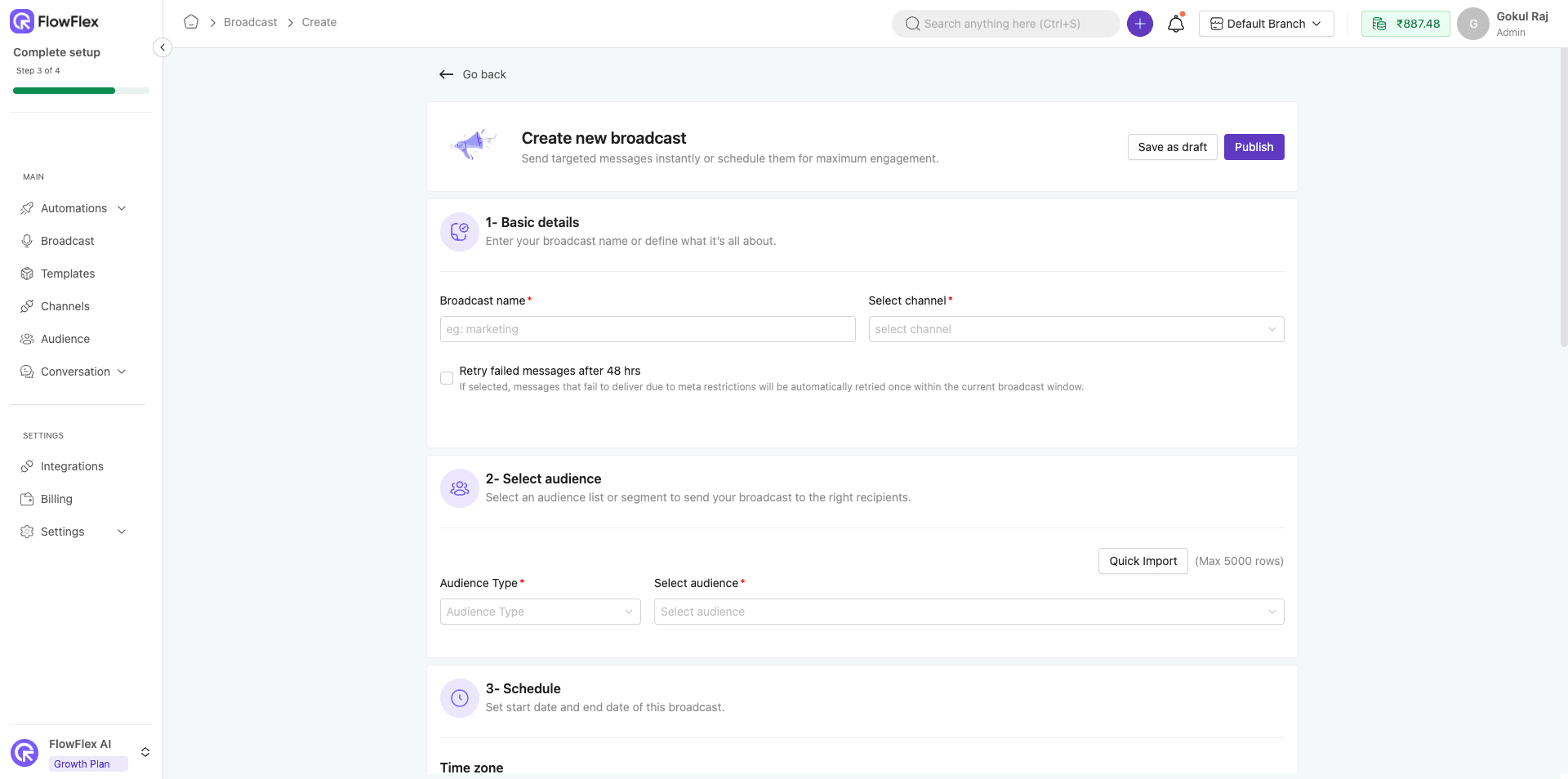
Broadcast → Send updates to thousands in one go.
Send offers, announcements, and reminders to thousands at once — using approved templates.
Schedule broadcasts for later or run instantly.
Import your client list and start sending in a single click.
Broadcast on WhatsApp without losing the personal touch.
Your WhatsApp Business app — now supercharged.
Add broadcasts. Keep your current number. No chaos.
Flowflex routes every reply to a shared inbox — assign owners, add tags, track SLAs.
“No more missed replies” — see all customer responses in one place.
Share the same WhatsApp number among multiple staff members.
Run broadcasts from Flowflex and manage conversations directly through your WhatsApp Business app.
Add all your business WhatsApp numbers to Flowflex and manage all conversations in a single chat window. No more multiple apps.
Flowflex routes every reply to a shared inbox — assign owners, add tags, track SLAs.
“No more missed replies” — see all customer responses in one place.
Share the same WhatsApp number among multiple staff members.
Run broadcasts from Flowflex and manage conversations directly through your WhatsApp Business app.
Add all your business WhatsApp numbers to Flowflex and manage all conversations in a single chat window. No more multiple apps.
Flowflex routes every reply to a shared inbox — assign owners, add tags, track SLAs.
“No more missed replies” — see all customer responses in one place.
Share the same WhatsApp number among multiple staff members.
Run broadcasts from Flowflex and manage conversations directly through your WhatsApp Business app.
Add all your business WhatsApp numbers to Flowflex and manage all conversations in a single chat window. No more multiple apps.

Stay ahead with automation
Segment, personalize, and send at scale
Stay ahead with automation
Segment, personalize, and send at scale
Stay ahead with automation
Segment, personalize, and send at scale
Segment your customers and send personalized broadcasts to your segments.
Send unlimited broadcasts and engage with over 100,000 users in seconds.
Schedule, segment, and see replies in one inbox. No migration chaos.
Keep using your WhatsApp Business app. Add broadcasts, segmentation, and a team inbox on top — no disruption
how it works
3 simple steps to effortless efficiency
how it works
3 simple steps to effortless efficiency
how it works
3 simple steps to effortless efficiency
Connect Your WhatsApp Business Number With Flowflex
Connect Your WhatsApp Business Number With Flowflex
Connect Your WhatsApp Business Number With Flowflex
Import Your Contacts / Client List To Our Dashboard.
Import Your Contacts / Client List To Our Dashboard.
Import Your Contacts / Client List To Our Dashboard.
Pick a template and segment Then send or schedule it
Pick a template and segment Then send or schedule it
Pick a template and segment Then send or schedule it
View and manage all customer replies directly from the team inbox, ensuring smooth and organized communication.
Encrypted
Encrypted
Encrypted
meta verified
meta verified
meta verified
Stay ahead with automation
Ready to stop sending from your phone?
Stay ahead with automation
Ready to stop sending from your phone?
Stay ahead with automation
Ready to stop sending from your phone?
View and manage all customer replies directly from the team inbox, ensuring smooth and organized communication.
FAQ
What's often asked about Flowflex
FAQ
What's often asked about Flowflex
FAQ
What's often asked about Flowflex

Have more questions? Contact our support team with any questions you may have.
Do I need to change my existing WhatsApp Business number to use Flowflex?
No. You can keep your current WhatsApp Business number. Flowflex sits on top of it and adds broadcasts, segmentation, and a shared inbox — without migration.
Can I send a broadcast to 10,000+ contacts at once?
Yes. Flowflex is built for large lists. You can import your client/customer list and send broadcasts to thousands in a single run (subject to your WhatsApp Business API limits and template approvals).
What happens when people reply to my broadcast?
Replies won’t stay on one person’s phone. Flowflex routes every reply to a shared team inbox where you can assign, tag, and track SLAs — so no reply is missed.
Can multiple team members reply from the same WhatsApp number?
Yes. You can share the same number among multiple users and assign conversations to each other. This is useful for sales, support, and operations teams.
Can I schedule broadcasts for later?
Yes. You can schedule messages for a specific date/time so you don’t have to send manually from your phone.
Can I segment my customers and send different broadcasts to different groups?
Yes. You can segment by list/source and send personalized campaigns to each segment — announcements for one group, offers for another.
Do I have to create templates every time?
No. You can use approved WhatsApp templates, save commonly used messages, and reuse them for future broadcasts.
We already use the WhatsApp Business app — why use Flowflex?
The app is great for 1:1 chats, not for sending to 1,000–10,000 people or distributing replies to a team. Flowflex gives you: bulk sending, scheduling, segmentation, and a shared inbox.
Can I add more than one WhatsApp number?
Yes. You can connect multiple business WhatsApp numbers and manage all conversations from a single chat window.
Will I lose chats if I start using Flowflex?
No. Flowflex is meant to reduce chaos, not create it. Broadcast replies come into the shared inbox so your team can handle them centrally.
Can I see which broadcasts got the most replies?
Yes. You can see replies in one place and route them to the right owner, so you know which campaign drove conversations.
Is there a limit on how many broadcasts I can run?
You can run multiple broadcasts. Actual throughput depends on your WhatsApp setup and plan, but Flowflex is designed for high-volume, recurring campaigns.
Can I import my existing customer list?
Yes. You can import your client list and start sending broadcasts in a single click.
Can I keep replying from my phone if I want to?
Yes. You can keep using your WhatsApp Business app — Flowflex just adds broadcast + team inbox on top.
Does Flowflex support routing to specific teams (sales/support)?
Yes. Since replies land in a shared inbox, you can assign to the right person, add tags, and measure agent performance.
Do I need to change my existing WhatsApp Business number to use Flowflex?
No. You can keep your current WhatsApp Business number. Flowflex sits on top of it and adds broadcasts, segmentation, and a shared inbox — without migration.
Can I send a broadcast to 10,000+ contacts at once?
Yes. Flowflex is built for large lists. You can import your client/customer list and send broadcasts to thousands in a single run (subject to your WhatsApp Business API limits and template approvals).
What happens when people reply to my broadcast?
Replies won’t stay on one person’s phone. Flowflex routes every reply to a shared team inbox where you can assign, tag, and track SLAs — so no reply is missed.
Can multiple team members reply from the same WhatsApp number?
Yes. You can share the same number among multiple users and assign conversations to each other. This is useful for sales, support, and operations teams.
Can I schedule broadcasts for later?
Yes. You can schedule messages for a specific date/time so you don’t have to send manually from your phone.
Can I segment my customers and send different broadcasts to different groups?
Yes. You can segment by list/source and send personalized campaigns to each segment — announcements for one group, offers for another.
Do I have to create templates every time?
No. You can use approved WhatsApp templates, save commonly used messages, and reuse them for future broadcasts.
We already use the WhatsApp Business app — why use Flowflex?
The app is great for 1:1 chats, not for sending to 1,000–10,000 people or distributing replies to a team. Flowflex gives you: bulk sending, scheduling, segmentation, and a shared inbox.
Can I add more than one WhatsApp number?
Yes. You can connect multiple business WhatsApp numbers and manage all conversations from a single chat window.
Will I lose chats if I start using Flowflex?
No. Flowflex is meant to reduce chaos, not create it. Broadcast replies come into the shared inbox so your team can handle them centrally.
Can I see which broadcasts got the most replies?
Yes. You can see replies in one place and route them to the right owner, so you know which campaign drove conversations.
Is there a limit on how many broadcasts I can run?
You can run multiple broadcasts. Actual throughput depends on your WhatsApp setup and plan, but Flowflex is designed for high-volume, recurring campaigns.
Can I import my existing customer list?
Yes. You can import your client list and start sending broadcasts in a single click.
Can I keep replying from my phone if I want to?
Yes. You can keep using your WhatsApp Business app — Flowflex just adds broadcast + team inbox on top.
Does Flowflex support routing to specific teams (sales/support)?
Yes. Since replies land in a shared inbox, you can assign to the right person, add tags, and measure agent performance.
Do I need to change my existing WhatsApp Business number to use Flowflex?
No. You can keep your current WhatsApp Business number. Flowflex sits on top of it and adds broadcasts, segmentation, and a shared inbox — without migration.
Can I send a broadcast to 10,000+ contacts at once?
Yes. Flowflex is built for large lists. You can import your client/customer list and send broadcasts to thousands in a single run (subject to your WhatsApp Business API limits and template approvals).
What happens when people reply to my broadcast?
Replies won’t stay on one person’s phone. Flowflex routes every reply to a shared team inbox where you can assign, tag, and track SLAs — so no reply is missed.
Can multiple team members reply from the same WhatsApp number?
Yes. You can share the same number among multiple users and assign conversations to each other. This is useful for sales, support, and operations teams.
Can I schedule broadcasts for later?
Yes. You can schedule messages for a specific date/time so you don’t have to send manually from your phone.
Can I segment my customers and send different broadcasts to different groups?
Yes. You can segment by list/source and send personalized campaigns to each segment — announcements for one group, offers for another.
Do I have to create templates every time?
No. You can use approved WhatsApp templates, save commonly used messages, and reuse them for future broadcasts.
We already use the WhatsApp Business app — why use Flowflex?
The app is great for 1:1 chats, not for sending to 1,000–10,000 people or distributing replies to a team. Flowflex gives you: bulk sending, scheduling, segmentation, and a shared inbox.
Can I add more than one WhatsApp number?
Yes. You can connect multiple business WhatsApp numbers and manage all conversations from a single chat window.
Will I lose chats if I start using Flowflex?
No. Flowflex is meant to reduce chaos, not create it. Broadcast replies come into the shared inbox so your team can handle them centrally.
Can I see which broadcasts got the most replies?
Yes. You can see replies in one place and route them to the right owner, so you know which campaign drove conversations.
Is there a limit on how many broadcasts I can run?
You can run multiple broadcasts. Actual throughput depends on your WhatsApp setup and plan, but Flowflex is designed for high-volume, recurring campaigns.
Can I import my existing customer list?
Yes. You can import your client list and start sending broadcasts in a single click.
Can I keep replying from my phone if I want to?
Yes. You can keep using your WhatsApp Business app — Flowflex just adds broadcast + team inbox on top.
Does Flowflex support routing to specific teams (sales/support)?
Yes. Since replies land in a shared inbox, you can assign to the right person, add tags, and measure agent performance.